Direct P2P vs Encrypted Relay: What Is the Real Difference?
Speed, privacy and reliability trade-offs between a direct WebRTC connection and a TURN relay — and what the relay can and cannot see.
Peer-to-peer tools love the phrase “your files never touch a server.” It is true only some of the time. When two networks cannot reach each other directly, WebRTC falls back to a relay — and an honest tool should tell you when that happens and what it means. Here is the real difference between the two paths.
What actually differs
| Direct (LAN or internet) | Encrypted relay (TURN) | |
|---|---|---|
| Path | Device ↔ device | Device ↔ relay server ↔ device |
| Encryption | End-to-end (DTLS) | Identical end-to-end encryption — the relay has no keys |
| Who can read content | Only the two devices | Only the two devices |
| Metadata exposure | Networks on the route see packet flow | Relay operator additionally sees both IPs, sizes, timing |
| Speed | LAN: often hundreds of Mbps; internet: bounded by both uplinks | Bounded by uplinks and the relay's bandwidth; one extra hop of latency |
Measured: what each path can actually sustain
Speed differences between the paths come from where the bottleneck sits, not from the protocol. To separate the two, we benchmarked the transfer engine itself with both browsers on one machine — no network in the way — and then compared that ceiling with what typical networks allow:
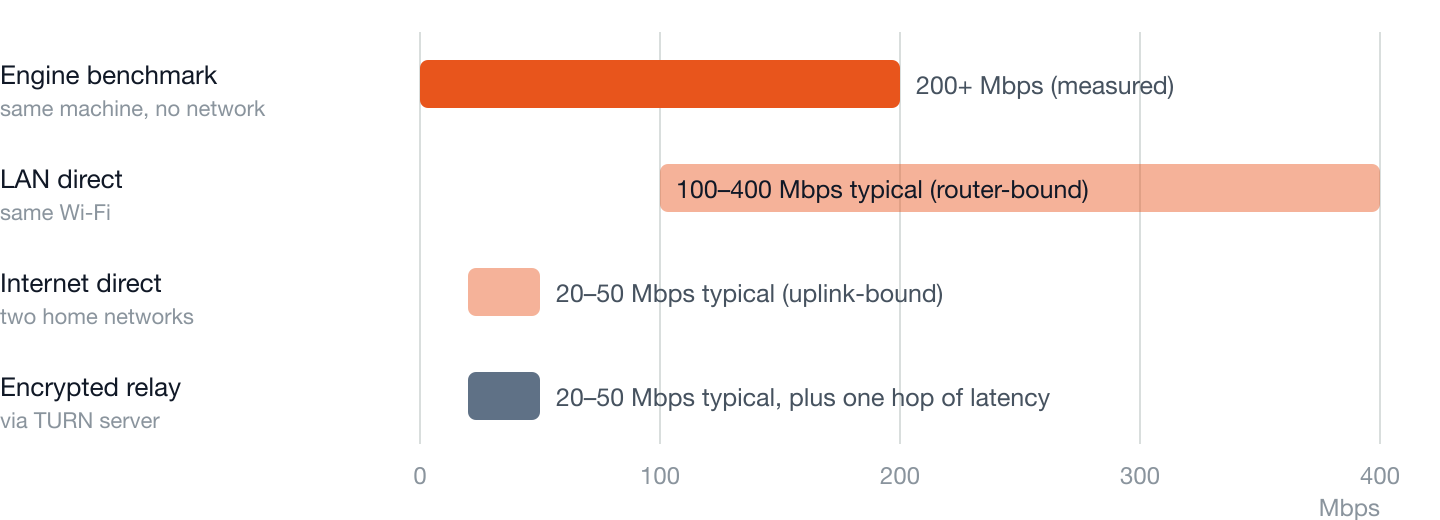
| Path | What sets the ceiling | Typical result |
|---|---|---|
| Engine benchmark | CPU only: DTLS encryption + SCTP framing + real-time SHA-256 on both ends | 200+ Mbps (25 MB/s) sustained, measured |
| LAN direct | Wi-Fi link rate of the slower device and the router | 100–400 Mbps on Wi-Fi 5/6 networks |
| Internet direct | The slower side's upload bandwidth | 20–50 Mbps on typical home broadband |
| Encrypted relay | Slower uplink and relay bandwidth; one extra network hop | Similar to internet direct, with roughly 10–80 ms added round-trip time depending on relay distance |
The practical reading: on a LAN the protocol is rarely the limit — the radio is. Across the internet, upload bandwidth dominates everything, which is why a relay usually costs you latency rather than throughput.
How we measured
- Throughput: two browser instances on one machine transfer a large file through the full production pipeline — encrypted data channel, 64 KiB chunking, and SHA-256 hashing running in real time on both ends. Same-machine loopback removes the network so the number isolates protocol and crypto overhead.
- Path classification: we read the selected ICE candidate pair from the live
getStats()connection statistics. If either candidate of the winning pair has typerelay, the transfer is on TURN; host/server-reflexive pairs are direct. This is the same signalchrome://webrtc-internalsshows, and the same logic that drives the path badge in the app. - Typical network figures: the LAN and uplink ranges above are stated as common magnitudes for home Wi-Fi 5/6 and home broadband plans, not as our benchmark results — your numbers depend on your hardware and plan.
The key insight: encryption is unchanged
The common fear — “relay mode means the operator can read my files” — is wrong for WebRTC. The DTLS keys protecting a data channel are negotiated between the two browsers during connection setup; a TURN relay authenticates you, allocates a forwarding port, and shovels ciphertext. This is not a policy promise but an architectural property (how WebRTC encryption works). What a relay does see is traffic metadata: who talked to whom, when, and how much. That is the honest cost of relay mode.
When you get which
- Same Wi-Fi: usually a LAN-direct connection — the fastest case.
- Two home networks: usually direct via hole punching (STUN).
- Office/campus/hotel networks, CGNAT, strict firewalls: often relay-only (why).
- Both sides on VPNs: frequently relay, sometimes nothing at all (VPN effects).
How to tell which one you got
In ShareDrop.org, look at the badge next to the title: LAN direct, Internet direct, or Encrypted relay. It is computed from the selected ICE candidate pair in the live connection statistics — if either side of the winning pair is a relay candidate, you are on TURN. When the browser exposes too little statistics to decide, we show “encrypted, mode unknown” rather than guess. Developers can verify the same thing in chrome://webrtc-internals: find the active candidate pair and check the local and remote candidate types.
Should you avoid relay mode?
For most transfers, no — it exists precisely so the transfer succeeds where direct paths cannot. Avoid it only if your threat model includes traffic-metadata collection by the relay operator, in which case the alternative is moving both devices onto the same trusted network and getting a LAN-direct link.
Standards referenced
- RFC 8445 — Interactive Connectivity Establishment (ICE): how the candidate pairs above are gathered and selected.
- RFC 8656 — Traversal Using Relays around NAT (TURN): the relay protocol, including why the relay only forwards and never terminates encryption.
- RFC 8831 — WebRTC Data Channels: the SCTP-over-DTLS stack every ShareDrop.org transfer runs on.
- RFC 8827 — WebRTC Security Architecture: the mandate that keys are negotiated end-to-end between browsers.