Why Large Files Crash Browser Tabs (and How Streaming Fixes It)
Memory limits, Blob buffering, the File System Access API and backpressure: what it takes to move a file bigger than your RAM through a browser.
Ask anyone who has built browser file transfer: small files are trivial, and large files are where tabs die. The crashes trace back to one root cause — buffering an entire file in memory — showing up in three different places.
Failure point 1: reading
The naive approach reads the whole file into an ArrayBuffer. A 4 GB video on a laptop with 8 GB of RAM ends the story right there. The fix is streaming: file.stream() yields chunks on demand, so the amount of file in memory at any moment stays constant regardless of file size.
Failure point 2: sending faster than the network
A disk reads at hundreds of MB/s; a typical uplink carries a fraction of that. Push chunks into a WebRTC data channel as fast as you read them and the channel's internal send buffer absorbs the difference — growing until the tab is killed. The standard fix is backpressure via bufferedAmount: pause reading when the buffered amount crosses a high-water mark, resume on the bufferedamountlow event. ShareDrop.org pauses at 8 MiB and resumes at 1 MiB, so sender memory stays bounded whether the file is 10 MB or 100 GB, and whether the link is fiber or hotel Wi-Fi.
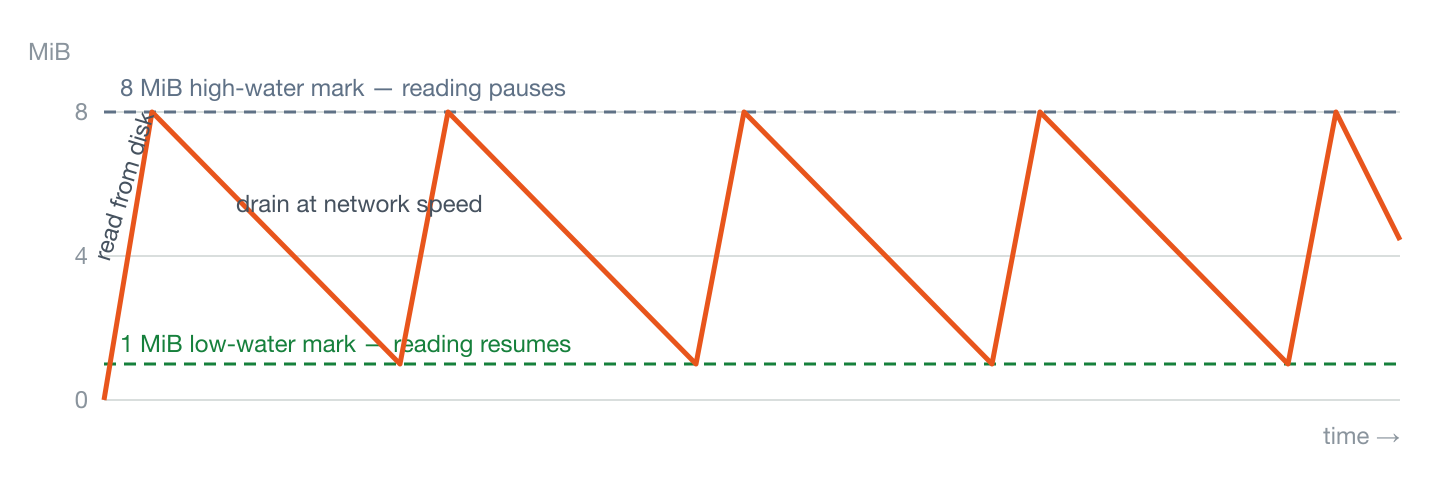
bufferedAmount over time with ShareDrop.org's production watermarks. Disk fills the buffer in moments; the network drains it slowly; the sawtooth never exceeds 8 MiB no matter how large the file is.Failure point 3: receiving
The receiver has the hardest problem: browsers historically offered no way to write a download progressively — you accumulated Blobs in memory and triggered a download at the end. That works until it doesn't, and “doesn't” arrives at different sizes on different devices. Two paths exist today:
- File System Access API (Chrome/Edge desktop): the user picks a destination once, and chunks are written to disk as they arrive. Memory stays flat; file size is bounded by disk, not RAM. This also enables preserving folder structures on folder transfers.
- In-memory fallback (Firefox, Safari): no streamed-write API is available, so the file must be assembled in memory. The only honest option is a hard cap communicated before the transfer starts — ShareDrop.org uses 512 MB — rather than letting users discover the limit as a crash at 97%.
| Receiving browser | Saving path | Memory while receiving | Practical limit |
|---|---|---|---|
| Chrome / Edge (desktop) | Streamed to disk (File System Access API) | Flat — a few MiB of chunk buffer | Disk space |
| Firefox (desktop) | In-memory assembly | Grows with the file | 512 MB, enforced before the transfer starts |
| Safari (macOS / iOS) | In-memory assembly | Grows with the file | 512 MB, enforced before the transfer starts |
| Mobile browsers in general | In-memory assembly | Grows with the file | 512 MB, enforced before the transfer starts |
Chunk size: smaller than you might expect
Data channel messages cannot be arbitrarily large — implementations negotiate a maximum message size, and large messages block the channel. ShareDrop.org uses 64 KiB chunks with a small binary header (transfer ID, file ID, chunk index), which keeps messages well within every browser's limits and gives fine-grained progress and incremental hashing for free. Chunking is also what makes resume-after-disconnect possible: the receiver reports the last chunk written to disk, and the sender continues from there instead of starting over.
The numbers, and how they are verified
- 64 KiB chunks, 8 MiB / 1 MiB watermarks are the production engine's real parameters, not illustrations — the engine test suite exercises the chunking, backpressure and resume logic against them on every change.
- Throughput is not the cost. In our same-machine benchmark the full pipeline — 64 KiB chunking, encrypted data channel, and real-time SHA-256 on both ends — sustains 200+ Mbps (25 MB/s). At that rate the protocol overhead is invisible next to any real network.
- Corruption is caught, not assumed away: the engine suite includes corrupted-chunk tests confirming that a flipped byte anywhere in the stream fails the end-to-end SHA-256 check instead of producing a silently broken file.
Takeaways when evaluating any transfer tool
- “No size limit” claims that ignore the receiving browser are marketing, not engineering (our honest limits).
- Constant-memory behaviour on both ends is the defining feature separating tools that handle real files from demos.
- If a tool cannot tell you which saving path your browser will use, it has not thought about the problem.
Standards referenced
- RFC 8831 — WebRTC Data Channels: message-size constraints and the SCTP-over-DTLS transport the chunks ride on.
- WHATWG Streams Standard — the backpressure model (
file.stream(), readable streams, watermarks) this article applies. - File System Access API (WICG) — the streamed-to-disk saving path on Chromium desktop.
- W3C File API — Blob semantics behind the in-memory fallback and its practical limits.