NAT Types Explained: Full Cone to Symmetric, in Plain Language
Every home router and every mobile carrier does the same trick: it hides many devices behind one public address. That trick, Network Address Translation, is why the internet did not run out of addresses in 2011, and why two devices that both want to talk directly sometimes cannot. This article explains the classic NAT behaviours without assuming you know what a port is, shows which pairs can connect and which need a relay, and ends with how to find out what your own network does.
Why NAT exists at all
The internet's original address scheme, IPv4, has about four billion addresses — generous in 1981, hopeless once every phone wanted one. NAT was proposed in 1994 as a stopgap: let a whole household share one public address by having the router rewrite packets on the way out and remember how to un-rewrite the replies. The stopgap became the architecture. The central pool of IPv4 addresses ran dry in 2011, and today nearly every consumer device sits behind at least one NAT, often two. The permanent fix, IPv6, is deployed on most mobile networks and a growing share of fixed ones, but until both ends of a connection have it, the rules below apply.
The one thing all NATs do
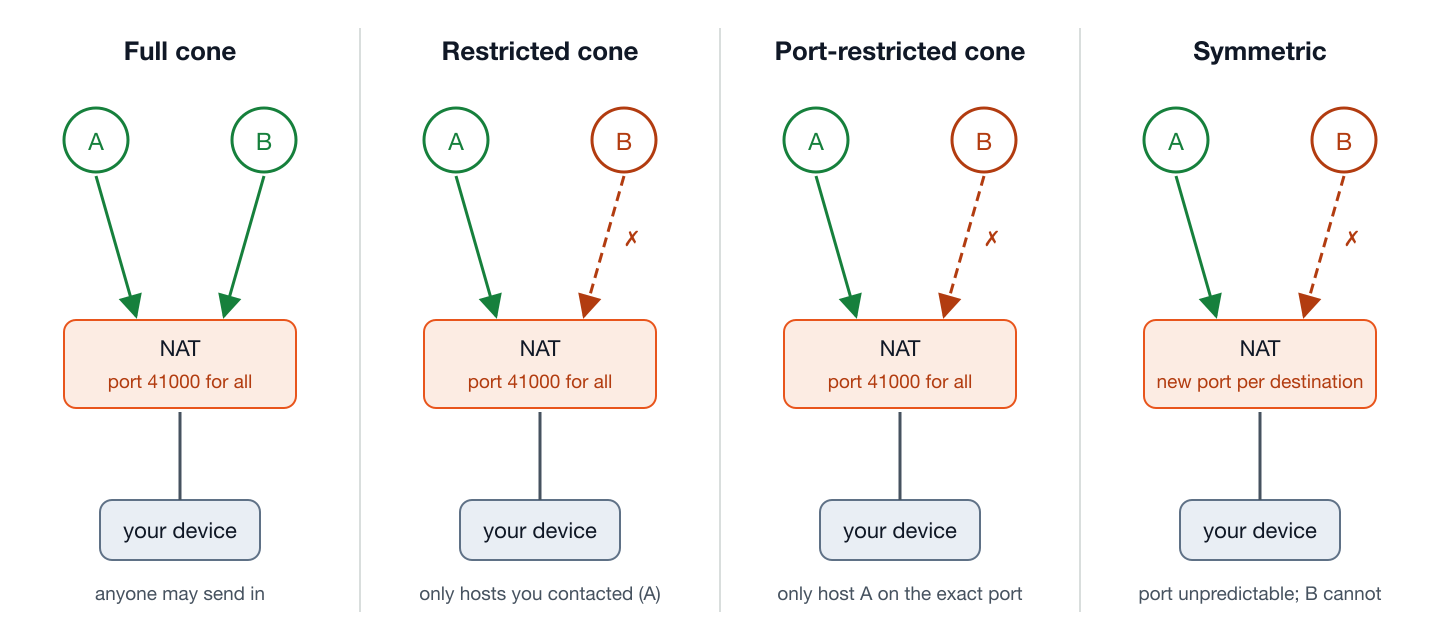
When your laptop at 192.168.1.20 sends a packet to a server, the router rewrites the source to its own public address, say 203.0.113.7, and picks a public port number to represent that conversation, for example 203.0.113.7:41000. It remembers the mapping so that replies to port 41000 get forwarded back to the laptop. So far, every NAT behaves the same. The differences are in two questions the router answers differently:
- Mapping: if the laptop talks to a second server, does it get the same public port, or a new one?
- Filtering: once a mapping exists, who is allowed to send packets in through it?
The four classic types
| Type | Mapping | Who can send in through port 41000 | Typically found in |
|---|---|---|---|
| Full cone | Same public port for every destination | Anyone, once the mapping exists | Older or deliberately open routers; rare today |
| Restricted cone | Same public port | Only hosts the device has already sent to (any port on that host) | Many home routers |
| Port-restricted cone | Same public port | Only the exact host and port the device has sent to | Most home routers and consumer mesh systems |
| Symmetric | New public port for each destination | Only the exact host and port, and nobody else could guess the port anyway | Mobile carriers (CGNAT), corporate firewalls, some ISP routers |
The modern vocabulary: mapping and filtering, separately
The four names above come from the original STUN specification of 2003 and are still what most people say. The current standard, RFC 4787, is more precise: it describes mapping and filtering as two independent dials, each with three settings, and the classic names are just four of the nine combinations.
| Endpoint-independent | Address-dependent | Address-and-port-dependent | |
|---|---|---|---|
| Mapping (which public port you get) | Same port for every destination: the cone behaviour; required by RFC 4787 | New port per destination host | New port per destination host and port — “symmetric” |
| Filtering (who may send in) | Anyone — full cone | Hosts you have sent to — restricted cone | Exact host and port you have sent to — port-restricted cone; recommended by RFC 4787 |
Read the two bold cells together and you have the router the standard wants: endpoint-independent mapping (so peers can learn a usable address) with address-and-port-dependent filtering (so strangers cannot walk in). That is a port-restricted cone, and it is why most home routers made in the last decade land there. Hole punching was designed around exactly this combination.
What STUN learns, and why it is not enough
A device cannot see its own public address from the inside. It asks a STUN server: “what address and port did my packet arrive from?” The answer, 203.0.113.7:41000, is the device's server-reflexive address, and it is what gets sent to the other peer. For endpoint-independent mapping that address is reusable: when the peer sends to it, the packet arrives, provided the device has first sent one packet outward to the peer to open the filter. For address-dependent mapping it is useless: the port STUN saw was for talking to STUN, and talking to the peer will get a different one that nobody can predict.
Hole punching, step by step
- Both devices learn their reflexive addresses from STUN and exchange them through the signaling server.
- Both start sending small check packets to each other's reflexive address at the same time.
- Device A's first packet reaches B's router, which has no matching filter entry yet and drops it, but A's own router has now recorded “A talked to B's address.”
- Device B's first packet reaches A's router, which now recognises B as a host A has contacted, and lets it through.
- A replies; B's router now recognises A. Both filters are open; the path is direct.
The trick depends on both routers using the same port for the peer that they used for STUN — endpoint-independent mapping. With address-dependent mapping, step 1 gave the peer a port that step 2 does not use, and the packets fall on closed doors forever.
A packet's-eye view of one connection
Take two laptops: A at 192.168.1.20 behind a home router with public address 203.0.113.7, and B at 10.0.0.5 behind another with public address 198.51.100.9. Both routers are port-restricted cones.
- A sends a STUN request from
192.168.1.20:51234. Its router creates a mapping, public port 41000, and forwards the packet. STUN replies: “you are203.0.113.7:41000.” B does the same and learns it is198.51.100.9:52000. - Through the signaling server, A learns B's public address and B learns A's. Neither router knows anything about the other yet.
- A sends a check packet from port 51234 to
198.51.100.9:52000. A's router, using endpoint-independent mapping, reuses public port 41000 and records “41000 has talked to 198.51.100.9:52000.” The packet arrives at B's router, which has no such record for its port 52000 — and drops it. - B, at nearly the same moment, sends its check to
203.0.113.7:41000. B's router records “52000 has talked to 203.0.113.7:41000.” The packet arrives at A's router, which finds the record it made in step 3 (this is a host and port A has contacted) and lets it through to A. - A replies. B's router now has its record from step 4, matches it, and forwards the reply to B. Both mappings are open in both directions. The connection is direct, and the badge reads Internet direct.
The whole exchange takes one round trip plus the time for both sides to start — a few hundred milliseconds. Now replace B's router with a symmetric one. In step 1 B learns port 52000, but in step 4, B's router assigns a new port, say 52017, for the conversation with A. B's check arrives at A from 198.51.100.9:52017, which A's router has never seen; dropped. A's checks go to 52000, which B's router never mapped to A; dropped. After a few retries, ICE gives up on that pair and falls through to the relay candidates, and the badge reads Encrypted relay.
Which pairs can connect directly
| Full cone | Restricted | Port-restricted | Symmetric | |
|---|---|---|---|---|
| Full cone | Direct | Direct | Direct | Direct |
| Restricted | Direct | Direct | Direct | Direct |
| Port-restricted | Direct | Direct | Direct | Usually relay |
| Symmetric | Direct | Direct | Usually relay | Relay |
Read it as: as long as at least one side has endpoint-independent mapping, the other side can learn a working address and hole punching succeeds. Symmetric against port-restricted fails because the symmetric side's port is unpredictable and the port-restricted side filters on exact port; symmetric against symmetric fails twice over. Those connections go through a TURN relay instead. That is not a failure of the tool; it is arithmetic.
Three details that decide real-world cases
Mapping lifetime and keepalives
A NAT mapping is not permanent: the router forgets it after a period with no traffic. RFC 4787 requires at least two minutes for UDP; real routers range from about thirty seconds to several minutes, and mobile carriers are at the short end. A live WebRTC connection sends periodic STUN keepalives, every fifteen to twenty-five seconds, so the mapping never expires while the transfer runs. It does explain a specific symptom: a transfer paused for a few minutes (a phone locked, a laptop asleep) can find its path gone when it resumes, and must re-run the checks. ShareDrop.org handles this as a reconnect and resumes from the last verified chunk.
Hairpinning
Two devices behind the same router each learn the same public address from STUN. If they try to reach each other through it, the router must loop the packet back inside, “hairpinning”, which RFC 4787 requires and which a surprising number of consumer routers still do not do. This is why ICE tries host candidates (the192.168.x.x addresses) first: two devices on one LAN should never depend on the router's public side at all. When you see LAN direct on the badge, that is the host pair winning.
Double NAT
An ISP modem doing NAT, with your own router behind it doing NAT again, is common and usually harmless: two cone NATs in series behave like one. It becomes a problem when either layer is symmetric, and it is a guaranteed problem for any feature that relies on port forwarding or UPnP, neither of which browsers use. If your router's WAN address is in 10.x, 192.168.x or 100.64–100.127.x, you are behind a second NAT.
Carrier-grade NAT: the symmetric case you meet every day
Mobile networks put thousands of phones behind each public address using carrier-grade NAT, and it is almost always symmetric. The address space it uses, 100.64.0.0/10, was reserved specifically for this (RFC 6598). A phone on cellular data therefore usually cannot accept a direct connection from another phone on cellular data — both go through a relay. The same phone on home Wi-Fi is behind a cone NAT and connects directly to most peers. This is why a transfer that shows Encrypted relay on the train shows Internet direct at home; nothing changed but the NAT. Some fixed-line ISPs use CGNAT too, particularly newer or cheaper ones; the WAN address test above tells you.
Does IPv6 end all this?
Partly. IPv6 has enough addresses that every device gets a public one, so there is no translation and no mapping to predict. But routers still run a stateful firewall that drops unsolicited inbound packets (the filtering half survives), so ICE and its connectivity checks are still needed; they just succeed more often, because both sides have real addresses and the check itself opens the filter. When both peers have working IPv6, WebRTC will usually pick an IPv6 host pair and the connection is direct even across two CGNAT mobile carriers. Deployment is uneven: many mobile carriers are fully IPv6, many fixed-line ISPs are not, and a peer without IPv6 forces the IPv4 path with all of the above.
If you have heard “NAT type” from a game console
PlayStation and Xbox report NAT as Open, Moderate or Strict (or Type 1/2/3). The mapping is approximate but useful: Open ≈ full cone or no NAT, Moderate ≈ restricted or port-restricted cone, Strict ≈ symmetric or a blocked firewall. A console that reports Strict on a given network is telling you that a peer-to-peer file transfer on the same network will probably relay.
What to expect from common networks
| Network | Likely behaviour | Direct to a peer at home? |
|---|---|---|
| Home Wi-Fi, consumer router | Port-restricted cone | Yes, almost always |
| Home Wi-Fi behind ISP CGNAT | Symmetric outer layer | Usually relay |
| Mobile data (4G/5G) | Symmetric CGNAT; often IPv6 available | Relay over IPv4; direct if both sides have IPv6 |
| Phone hotspot | Cone NAT on the phone, CGNAT behind it | Devices on the hotspot: LAN direct to each other; to the outside, as mobile data |
| Office / university | Symmetric, often UDP-restricted | Relay, sometimes relay over TCP only |
| Hotel / café | Cone NAT with client isolation | Direct to outside peers; relay to the device next to you (why) |
| VPN on | Depends on the provider; frequently symmetric | Often relay (details) |
Port forwarding, UPnP and NAT-PMP: why browsers do not use them
Every home router can be told to forward a public port to a specific device, either by hand or automatically through UPnP or NAT-PMP, and gamers and self-hosters do this routinely. Browsers deliberately do not. A web page cannot be trusted to reconfigure your router, so the WebRTC standard gives it no way to try; ICE works with whatever the NAT does on its own. That is the right trade (it means visiting a web page can never punch a permanent hole in your firewall), but it is why a browser transfer can end up on a relay in a network where a game console reports an Open NAT. The console asked the router for a forward; the browser could not.
Four things NAT is not
- NAT is not a firewall. It drops unsolicited packets as a side effect of not knowing where to send them, which feels like a firewall and is often the only one a home has. But it inspects nothing and can be traversed by design: that is what this whole article describes. A real firewall is a separate function, and corporate networks have both.
- “Symmetric” does not mean balanced. The name refers to the NAT mapping being specific to each destination, so that the mapping seen by one peer is not the mapping seen by another. It is the least symmetrical behaviour from the outside: an unfortunate label that has stuck for two decades.
- A VPN does not fix NAT. It moves you behind the VPN provider's NAT instead of your own, which is frequently symmetric, and it changes the path every packet takes. Transfers often get slower or fall to a relay when a VPN comes on (details).
- Two devices on one router are not “behind the same NAT” in the useful sense. They can reach each other directly by local address and never need the router's public side at all; the NAT is irrelevant to them unless the access point isolates clients, which is a different mechanism entirely.
How to find out what you have
- In Chrome: open
chrome://webrtc-internalsduring any WebRTC session and find the candidate pair marked as selected. Your side's candidate type tells the story:hostmeans the peer reached your local address (same network or IPv6);srflxmeans hole punching through a cone NAT worked;relaymeans it did not. - From a terminal: any STUN client (for example
pystun3on Python) sends test packets to two STUN servers and reports whether your public port stayed the same, the mapping question, and what filtering it detected. - From the router: the WAN or Internet address on its status page. A public address means one NAT; a private or
100.64.xaddress means CGNAT or double NAT in front of it. - In ShareDrop.org: the status badge does the reading for you and reports LAN direct, Internet direct or Encrypted relay from the live selected pair.
Standards referenced
- RFC 4787: NAT Behavioral Requirements for UDP: mapping and filtering vocabulary, the two-minute minimum mapping lifetime, hairpinning.
- RFC 3489: the original STUN specification that introduced the four-type classification (now historic).
- RFC 5128: State of Peer-to-Peer Communication across NATs: the hole-punching technique.
- RFC 8489: current STUN.
- RFC 8445: ICE: candidate priorities and connectivity checks, including the keepalives.
- RFC 6598: the shared address space reserved for carrier-grade NAT.