Cloud Link vs Direct Transfer: Where Your File Actually Goes
“I'll send you a link” and “I'll send you the file” feel like the same act. They are not. One creates a copy on a server and hands out a key to it; the other moves bytes from one device to another and stops. The difference decides how many copies of your file exist, who holds them, and how long, which is worth understanding once, so the choice becomes deliberate.
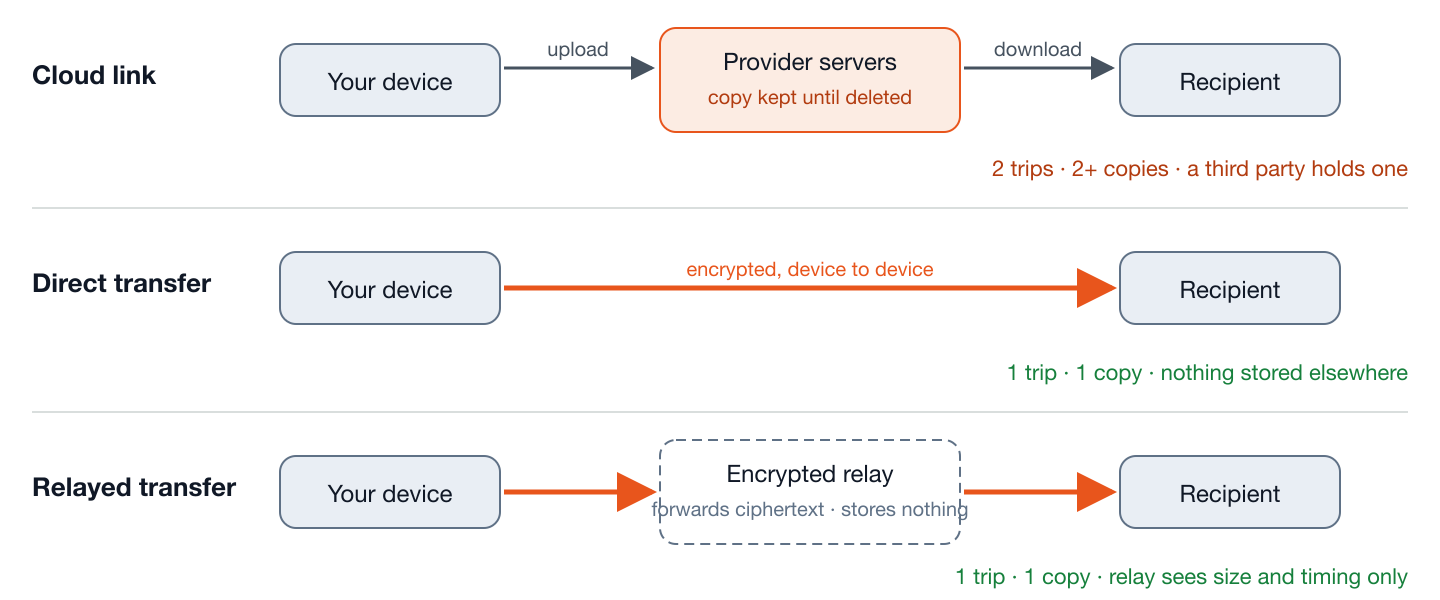
The cloud link, step by step
- Your device uploads the whole file to the provider. Copy #1 now exists on their servers.
- The provider generates a link — a bearer token: anyone who has it can fetch the file.
- The recipient downloads. Copy #2, on their device. Copy #1 remains.
- The provider keeps its copy until you delete it, or until a retention period expires, and often keeps versions, a trash copy, and backups beyond that.
Two trips across the internet (up, then down), one persistent copy on a third party's infrastructure, and an access model where the link is the credential.
The direct transfer, step by step
- Both devices open a page and are introduced to each other by a rendezvous server, which learns that two devices want to connect and nothing about the file.
- The devices negotiate an encrypted connection directly between themselves (how).
- Bytes flow from one device to the other. The recipient verifies the checksum. Copy #2 exists; nothing else does.
- If the two networks cannot connect directly, an encrypted relay forwards packets. It stores nothing and cannot decrypt anything (what it can see).
One trip, no stored copy, and no link that can be forwarded, guessed or leaked later, because there is nothing to link to once the transfer is over.
Counting copies
| Cloud link | Direct transfer | |
|---|---|---|
| Copies created | At least 2 (server + recipient); typically more with versioning and backups | 1 (recipient) |
| Held by a third party | Yes, until deleted or expired | No |
| Who can read it | You, the recipient, the provider, and anyone with the link | You and the recipient |
| Trips over the internet | Two (upload, download) | One (or zero, on the same Wi-Fi) |
| Works when the recipient is offline | Yes: that is its main strength | No |
| Multiple recipients | Same link, no extra effort | One transfer per recipient |
| Revocable | Delete the file or the link, if the recipient has not downloaded yet | Nothing to revoke |
The link is a key: treat it like one
A share link works for whoever holds it. Forwarded in an email thread, pasted in a chat that gets screenshotted, or logged by a corporate proxy, it keeps working. Providers mitigate this with expiry dates, passwords and “specific people only” modes; use them, because the default is usually “anyone with the link.” A direct transfer has no equivalent exposure: the short code that introduces the two devices expires in minutes and unlocks nothing once the session ends.
Speed: the two-trip tax
Home broadband uploads are slow — 20–50 Mbps is typical. A cloud link pays that upload once, then the recipient pays a download. A direct transfer between two homes pays the same upload once and the recipient receives it as it happens: total time is one upload, not an upload plus a download. On the same Wi-Fi the difference is dramatic: the cloud path still goes out to the internet and back; the direct path never leaves the router (the numbers).
Sharing controls, by provider
The safety of a link depends on the controls around it, and those differ more than people assume. At the time of writing, on personal accounts:
| Service | Restrict to specific people | Link expiry | Link password |
|---|---|---|---|
| Google Drive | Yes | Paid Workspace plans only | No |
| OneDrive | Yes | Microsoft 365 subscription | Microsoft 365 subscription |
| Dropbox | Yes | Paid plans | Paid plans |
| iCloud Drive | Yes (“only people you invite”) | No | No |
The pattern: on free tiers, the only strong control is restricting the share to named accounts, which requires the recipient to sign in. “Anyone with the link” with no expiry and no password is a link that works forever for whoever finds it. Check the provider's current help page, because these change.
What “delete” means, by provider
| Service | After you delete | Gone for good when |
|---|---|---|
| Google Drive | Trash for 30 days | Trash emptied, or 30 days pass |
| OneDrive (personal) | Recycle bin for 30 days | Bin emptied, or 30 days pass |
| Dropbox | Recoverable for 30 days (longer on paid plans) | Permanently deleted from the deleted-files view, or the window passes |
| iCloud Drive | Recently Deleted for 30 days | Deleted from Recently Deleted, or 30 days pass |
Backups the provider keeps for its own resilience are outside your control entirely and are covered, if at all, by the privacy policy. For a link that should really be gone, delete the file, then empty the trash, then revoke the share, in that order, because a revoked link on a file still in the trash may be restorable.
A worked example: 3 GB across town
Two friends on home broadband, 30 Mbps upload and 100 Mbps download each.
- Cloud link: the sender uploads 3 GB at 30 Mbps — about 13 minutes. Then the recipient downloads at 100 Mbps — about 4 minutes, whenever they get to it. Total elapsed: 17 minutes plus the wait; one copy in the cloud.
- Direct transfer: the sender uploads 3 GB at 30 Mbps, about 13 minutes, and the recipient has it at the end of those 13 minutes. No second trip, no copy.
- Same Wi-Fi instead: the cloud path still takes 17 minutes, because it still leaves the house and comes back. The direct path runs at the router's speed: about two minutes.
The link as a record
One honest advantage of the cloud path: the provider logs who accessed the file and when, and for a shared folder keeps a history of changes. For a business handing documents to a client, that audit trail is a feature, and a direct transfer has no equivalent: it leaves no record anywhere except the two devices. If “prove they received it” matters more than “leave no copy,” the link is the right tool.
Two things links do that people forget
A link in a group is a link for the group. Paste an “anyone with the link” share into a chat with twenty people and all twenty, and everyone they forward it to, can open the file for as long as it exists. For anything you would not post publicly, share to named accounts instead, and accept that they must sign in.
A popular link can stop working. Providers rate-limit downloads of a file that is fetched unusually often, and may block it temporarily; a file shared with a large audience can go dark at the moment it matters. For distribution to many people that is a reason to use a service built for it rather than a personal drive; for one recipient it never comes up.
One case where the cloud path is faster for the recipient
A direct transfer delivers at the sender's upload speed, which is usually the slowest link involved. A cloud link separates the two halves: the sender uploads at their upload speed whenever they like, and the recipient later downloads at their download speed, which is typically several times faster. If the sender can upload in advance (overnight, before a meeting), the recipient's own wait is shorter with a link than with a live transfer. The total work is more and a copy is left behind, but the person at the receiving end experiences a four-minute download instead of a thirteen-minute transfer. Worth knowing when the recipient's time is the scarce resource.
Which to choose
- Recipient is offline, or there are several of them: cloud link. This is what it is for.
- The file should live somewhere shared long-term: cloud, deliberately, with access set to specific people.
- One person, available now, and you do not want a copy anywhere: direct transfer.
- Sensitive content: direct transfer, or a cloud link only from a provider with genuine end-to-end encryption (how to tell) and an expiry set.
Neither is the “secure” option in the abstract. A link is a convenient persistent object; a transfer is a private momentary one. Knowing which you are creating is most of the decision.